

Email channel: receive and reply to customer emails from Telegram
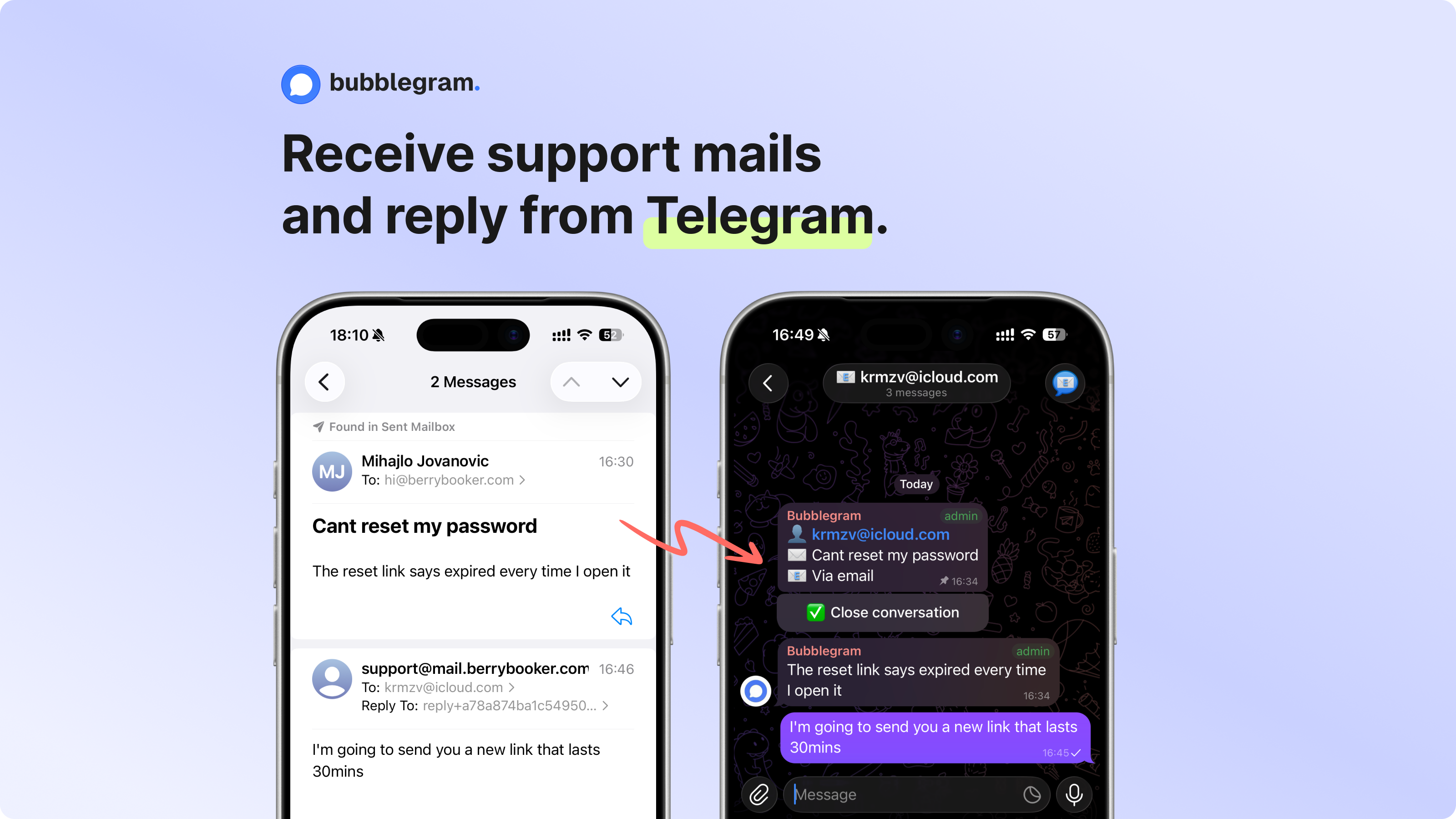
Not every customer uses your chat widget. Some find your support email and write there instead. Until now, that meant switching to a separate inbox. The email channel fixes that: customer emails land in your Telegram group as topics. You reply in Telegram, they get an email back.
How it works
You forward your support address (e.g. [email protected]) to a unique inbound address Bubblegram generates for your project. Incoming emails become Telegram topics. Returning senders land in their existing topic automatically.
Setup is four steps:
- Enable the email channel in your project dashboard
- Copy the generated inbound address
- Add it as a forwarding destination in your email provider
- Send a test email to confirm
The dashboard has step-by-step forwarding instructions for Gmail, Google Workspace, Outlook, Microsoft 365, and Cloudflare Email Routing. Gmail’s forwarding confirmation (the verification code Google sends to the new address) gets caught automatically and surfaced in the dashboard, so you don’t need to dig through a separate inbox to find it.
Reply from your own domain
When you reply in a Telegram topic, the customer receives an email. If you’ve verified your domain, it comes from your address (e.g. [email protected]). No “sent via” footer, no third-party branding. Plain text, from you.
Domain verification means adding three DNS records: SPF, DKIM, and DMARC. The dashboard shows the exact records with copy buttons, and a verify button that checks them against Resend’s API. Before verification, replies go out from [email protected] with a reply-to that still routes responses back to the correct Telegram topic.
Cross-channel conversations
A customer might start in the widget, leave your site, and reply to the email they received later. Or they email first, then find the widget and continue there. Either way, the conversation stays in one Telegram topic.
Messages are tracked per-message, not per-channel. Widget and email messages mix naturally in the same session. Email messages show a [via email] tag in Telegram so you know the customer isn’t online in the widget right now.
Smart delivery
If you send three replies in quick succession, Bubblegram bundles them into one email after a 30-second window. No one wants five separate emails for a back-and-forth.
If the customer has the widget open and sees the reply in real time, the email is skipped entirely.
Spam and loop prevention
Forwarding rules can create loops: you reply, the email passes through the customer’s forwarding, comes back as an inbound message. Bubblegram tags every outbound email with a header and drops anything that comes back with that tag.
Auto-replies (out-of-office, vacation responders) are detected via the Auto-Submitted header and dropped before they reach your Telegram. A per-sender rate limit of 5 emails per 5 minutes catches anything the header detection misses.
Inbound emails also go through sender verification. If DMARC fails on a message that wasn’t routed via a reply token (meaning it’s a new conversation, not a reply to something you sent), the message is flagged with a warning in the Telegram topic.
Fake and disposable email blocking
Bubblegram already blocks temporary and disposable email addresses on the widget side, using a blocklist of 8,000+ throwaway domains (Guerrilla Mail, Mailinator, Temp Mail, and similar services). This same protection carries over: if someone sends from a known disposable address, it won’t create noise in your Telegram group.
Bounces
Hard bounces and spam complaints trigger a notification in the Telegram topic and add the address to a suppression list. Future replies to that address are skipped automatically, so you don’t waste sending reputation on dead mailboxes.
Attachments
Images arrive as photos in the Telegram topic, other files as documents. Anything over Telegram’s file size limit gets a note instead of failing silently.
Pricing
Email is a Pro plan feature. Free plan users see the setup page with an upgrade prompt. If your plan lapses, inbound emails are paused (not lost) and you get a Telegram notification explaining why.
Why route email through Telegram?
You already handle widget messages in Telegram. Monitoring alerts are there. Team chat is there. Email is the one channel that pulls you out.
The email channel doesn’t replace your inbox. It means you can answer [email protected] from the same place you answer everything else. The customer gets a normal email reply and never knows it was sent from Telegram.
The email channel is available now on all Pro plans. Enable it from your project’s Email tab in the dashboard. New to Bubblegram? See how to use Telegram for customer support to get started.
Reply from Telegram.
Skip the dashboard.
Most support tools are overkill. Bubblegram routes messages to Telegram and gets out of the way.
Start for free